

In this guide
Use sonar to answer a specific question: where is the bottom, what changes along this pass, and are there repeatable targets worth investigating? A coloured mark is evidence of an echo. It is not an identification of a species, a measurement of its weight or proof that it will take your lure.
Know which view you are reading
Begin with the manual for the installed display and transducer. Traditional sonar, down-looking imaging and side-looking imaging present information differently. The labels and controls also differ between models. Record the view, frequency or mode, depth units and range before comparing screenshots. A memorable image without those settings is a weak reference.
Raymarine explains that apparent target shape and size depend on the sonar technology and movement, rather than directly reproducing an animal’s dimensions. Garmin describes fish symbols as an interpretation of suspended targets. For learning, inspect the underlying returns rather than treating every symbol as a confirmed fish.
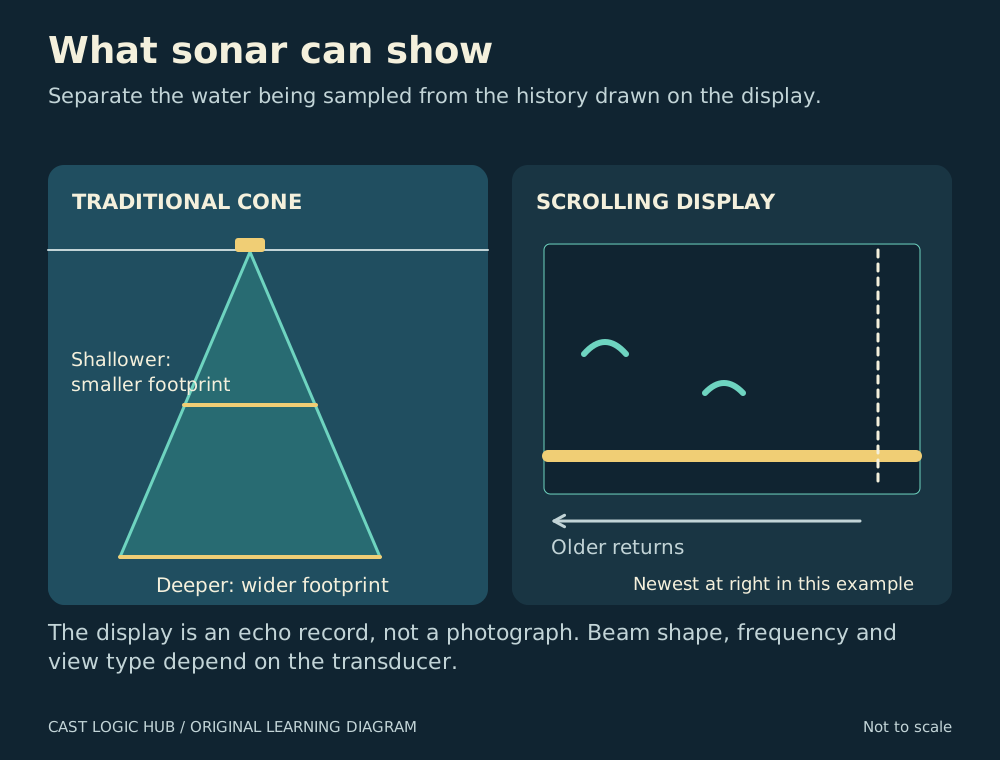
Separate present information from history
A scrolling display retains earlier returns. The chart’s horizontal dimension is not automatically the distance beside your boat. Garmin’s scroll-speed guidance shows why the same feature can look stretched when scroll speed changes. A slower setting holds information on screen longer; a faster setting can eventually stretch existing detail rather than reveal more.
Where provided, an A-scope gives an instantaneous range display beside the scrolling history. Learn which part of your own screen is updating now. When you notice a target halfway across the history, do not assume it remains directly under the transducer.
A controlled familiarisation pass
- Choose a safe, familiar area with room to manoeuvre and a bottom feature already shown on an appropriate chart. Keep someone responsible for navigation and lookout.
- Begin with the manufacturer’s normal or automatic settings. Save a screenshot and note boat speed, heading, depth range and sonar mode.
- Travel one clear line across the feature. Identify the bottom trace before investigating suspended marks.
- Repeat the same route at a comparable speed. Look for the feature returning in a similar position and depth context.
- Change one display setting, such as scroll speed, then repeat. Describe what changed on screen without claiming the bottom itself changed.
- Return to the useful baseline. Save settings with the screenshot so you can reproduce the comparison later.
This exercise is an editorial learning method, not a fish-detection calibration. It teaches you which visual changes are caused by controls and which persist across passes.
Interpreting a useful return
| Observation | Useful question | Conclusion to avoid |
|---|---|---|
| Repeated depth change | Does it agree with the route and chart? | Every edge holds fish. |
| Suspended mark | Does it repeat, and what else explains it? | The icon identifies a particular species. |
| Large-looking target | Did mode, movement or scale alter its appearance? | The screen gives an accurate fish weight. |
| Strong bottom return | How does the manual explain its colour and processing? | One colour proves a precise sediment type. |
Troubleshoot before changing fishing tactics
If the display becomes unreadable, first record whether the problem follows a change in speed, settings or another powered device. Compare against the documented baseline. Check the owner’s troubleshooting guide for transducer installation, interference and supported combinations; do not compensate indefinitely by turning every sensitivity control down.
Garmin’s appearance settings distinguish colour intensity, edge highlighting and target symbols. Those controls can change the emphasis of a return without changing what was detected. Compare like with like and avoid using a vivid colour palette as evidence that one unit discovers more fish.
Turn information into a fishing decision
Mark a repeatable feature with a descriptive waypoint, then choose a presentation suited to its depth and access. If no useful returns appear, you have only learned about the area covered by the equipment during those passes. You have not proved the whole water is empty. Keep the resulting fishing notes separate from the sonar interpretation so a later catch does not retroactively turn every earlier mark into the same species.
Questions from the bank
Keep it helpful. Comments are moderated. Do not share precise locations or personal information.
No approved comments yet. Ask a practical question or share what you learned.